
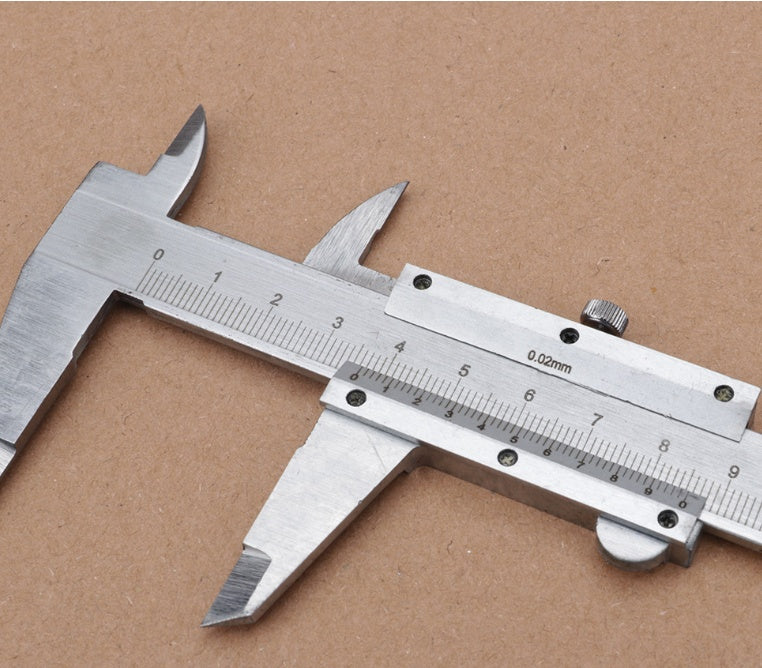
How to Use a Vernier Caliper (Step-by-Step)
A Vernier Caliper is a precision measuring instrument used to measure:
- External dimensions (outside diameter, thickness)
- Internal dimensions (inside diameter)
- Depth (holes, slots)

Least Count (Most Important Concept)
Least Count (LC) = smallest measurement the caliper can read
Example:
1 main scale division = 1 mm
Vernier scale divisions = 10
Measuring External Dimensions (Thickness / Diameter)
Steps:
- Clean the jaws and object.
- Place the object between the outside jaws.
- Close the jaws gently (do not force).
- Lock the caliper (if available).
- Take the reading.
Measuring Internal Dimensions (Inside Diameter)
Steps:
- Insert the inside jaws into the hole.
- Open the jaws until they touch the inner walls.
- Lock and read.
Measuring Depth
Steps:
- Place the base flat on the surface.
- Slide the caliper until the depth rod touches the bottom.
- Read the scale.
How to Take the Reading
Step 1: Main Scale Reading (MSR)
Read the value just before the Vernier zero.
Step 2: Vernier Scale Reading (VSR)
Find the Vernier line that perfectly aligns with a main scale line.
Step 3: Final Measurement
Zero Error (If Present)
Positive Zero Error Vernier zero is to the right of main zero → Subtract zero error
Negative Zero Error Vernier zero is to the left of main zero → Add zero error
Common Mistakes to Avoid
- ❌ Applying too much force
- ❌ Reading the wrong Vernier line
- ❌ Ignoring zero error
- ❌ Measuring dirty or rough surfaces
Typical Accuracy
- Manual Vernier Caliper: ±0.1 mm or ±0.02 mm
- Digital Vernier Caliper: ±0.01 mm
0 comments